What a MD file actually is
Markdown was designed in 2004 as a way to write formatted text without a word processor: a # at the start of a line makes a heading, asterisks make italic and bold, a dash makes a list item, and a link is [text](url). The file is plain text, so it opens anywhere, survives any transfer, and can be read raw even by software that has never heard of it. That is the point of it.
You have one because something exported it. GitHub projects carry a README.md; Obsidian, Bear, Joplin and Notion export notes as Markdown; ChatGPT, Claude and other assistants offer their answers as .md; static-site tools and documentation systems are built on it. It is the closest thing to a universal notes format that exists, precisely because it is not owned by any one app.
So the question is rarely whether it opens, and usually how to see it formatted, and how to hand it to someone who expects a PDF or a Word file. The inspector above shows the raw text and its encoding; the sections below name the apps that render it and the converter that turns it into the formats other people ask for.
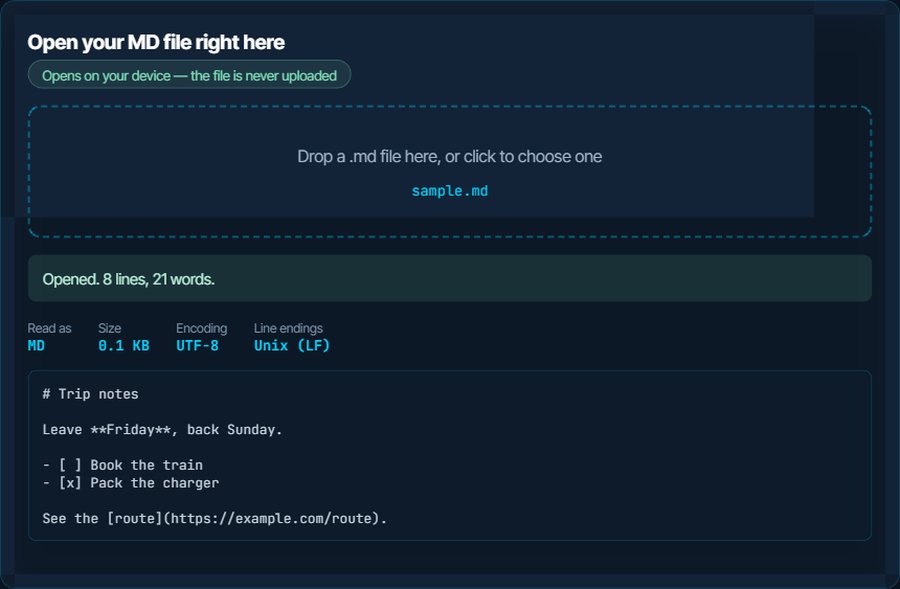
# Trip notes

Leave **Friday**, back Sunday.

- [ ] Book the train
- [x] Pack the charger

See the [route](https://example.com/route).
How to open a MD file on each device
Windows
Notepad opens it as text, symbols and all. To see it formatted, Visual Studio Code has a Markdown preview built in, and Typora, Obsidian and MarkText are editors that show the formatting as you type. Word does not render Markdown; convert to DOCX below.
macOS
TextEdit and Quick Look show the raw text. Typora, Obsidian, iA Writer and Bear render it; Marked 2 is a preview-only app that watches a file. Pages and Word need a DOCX, which the converter produces.
iPhone and iPad
The Files app shows the raw text. Obsidian, iA Writer, Bear and Taio open and render Markdown files from Files or iCloud, and Notes imports a converted DOCX or PDF.
Android
Files by Google shows it as text. Obsidian, Markor and Joplin render it and edit it. For sharing, convert to PDF.
In a browser
A browser shows an .md file as plain text unless an extension renders it. GitHub, GitLab and most wikis render it in place. The Markdown converter on this site shows a live preview as you paste or drop the file, which is the quickest way to read one formatted.
In Word, Google Docs and email
None of them render Markdown natively. Convert to DOCX for Word and Google Docs, to PDF for email and printing, or to HTML for a web page or a newsletter tool. The converter keeps headings, lists, tables, code blocks and links.
When it will not open, or opens wrong
It opens, but the text is full of # and * symbols
You are seeing Markdown raw in a plain text editor. Nothing is broken; the symbols are the formatting.
The fix: Open it in an app that renders Markdown, or paste it into the Markdown converter on this site for a formatted preview and a PDF or DOCX to send on.
Windows asks which program to use
.md is not associated with anything by default.
The fix: Choose Notepad for a quick look, or Visual Studio Code, Typora or Obsidian to see it formatted, and tick Always.
Tables, checkboxes or strikethrough do not show
Those are GitHub-flavoured extensions, not part of the original Markdown, and some renderers only implement the original.
The fix: The converter here supports GitHub-flavoured Markdown, tables and task lists included. Typora and Obsidian render them too.
Images are missing
The file references images by relative path, and the images live in a folder next to it that did not come along.
The fix: Keep the file and its image folder together, or use absolute URLs for images that are online. A converted PDF embeds whatever images it can reach.
Double square brackets and other odd syntax
Obsidian, Roam and Logseq add wiki-style links, tags and block references that only they understand.
The fix: They render as plain text elsewhere. Obsidian can export a note with standard links for sharing.
Accents come out wrong
The file is not UTF-8, which is rare for Markdown but happens with files from old editors.
The fix: The inspector reports the encoding and the Download as UTF-8 button rewrites the file.
What to do with it next
Questions people ask
What is an MD file?
A Markdown file: plain text with a few symbols for headings, bold, lists and links. README files on GitHub, exported notes and AI assistant outputs are the usual sources.
How do I open an MD file?
Any text editor opens it, but shows the symbols. To see it formatted, use Visual Studio Code, Typora, Obsidian or iA Writer, or paste it into the Markdown converter on this site for a live preview.
How do I convert an MD file to PDF or Word?
Use the Markdown converter on this site: drop the file or paste the text, choose PDF, DOCX or HTML, download. It runs in the browser and keeps headings, lists, tables and links.
Why does Notepad show hash signs and asterisks?
Because it is a plain text editor showing the file as written. The hash signs are headings and the asterisks are bold or italic in Markdown. A Markdown app renders them.
Can I open an MD file in Word?
Word opens it as plain text and does not render the formatting. Convert to DOCX first, and Word shows proper headings, lists and links.
Is Markdown the same as a text file?
It is a text file with a convention on top. Rename it to .txt and nothing changes inside; rename a .txt to .md and a Markdown app will render whatever symbols it happens to contain.