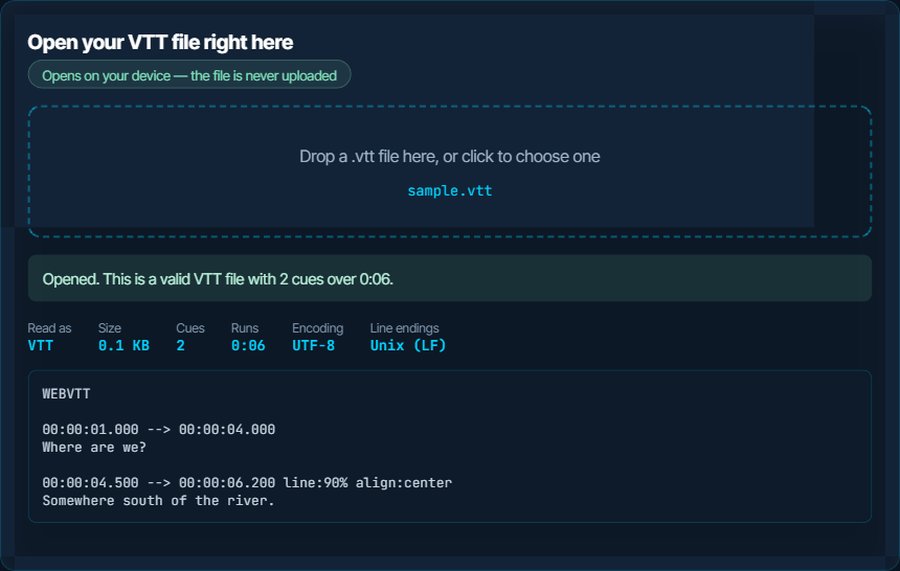
What a VTT file actually is
WebVTT is SRT rebuilt for the web: the same cue structure, a WEBVTT header line, a dot instead of a comma before the milliseconds, and optional positioning settings after the timestamp. It is the only subtitle format HTML5 video natively understands, which is why every browser-based player ends up using it.
Most people holding one today did not go looking for it. Zoom and Microsoft Teams export cloud-recording transcripts as .vtt, YouTube Studio offers it as a download, and Vimeo, Panopto and course platforms hand it back after auto-captioning. So the question is usually not “what is this” but “how do I read this meeting transcript”, and the answer is: any text editor, or the box above.
The header is not decoration. A file whose first line is not WEBVTT is rejected outright by browsers, and that one missing line is the most common reason a .vtt “does not work”. The inspector checks it first.
WEBVTT

00:00:01.000 --> 00:00:04.000
Where are we?

00:00:04.500 --> 00:00:06.200 line:90% align:center
Somewhere south of the river.
How to open a VTT file on each device
Windows
Double-click and Notepad opens it as text, which is all a meeting transcript needs. To watch a video with it, put the .vtt in the same folder with the same name and open the video in VLC, mpv or MPC-HC. The Films & TV app is less reliable with VTT than with SRT; convert to SRT if it ignores the file.
macOS
QuickTime Player will not load an external subtitle file of any kind. VLC and IINA both load a .vtt when you drag it onto the playing video. TextEdit opens it as text.
iPhone and iPad
The Files app previews a .vtt as plain text, so a transcript is readable on the spot. To watch with it, copy the video and the .vtt into VLC for iOS or Infuse and pick it from the subtitle menu.
Android
Files by Google opens it as text. VLC for Android and MX Player load a same-name .vtt automatically, and both let you choose a subtitle file by hand.
In a browser
This is where VTT is at home. Open the video page with the file referenced in a <track> element, or simply drag the .vtt into a Chrome or Firefox tab to read it. Browsers only load a track from the same origin as the page unless CORS allows otherwise, which is the usual reason a track “silently” fails on a website.
Zoom, Teams and YouTube
Zoom's transcript is a .vtt in the cloud-recording download; Teams offers one from the meeting recap. Both are plain WebVTT with speaker names on the cue lines. YouTube Studio accepts a .vtt upload directly, with positioning kept.
When it will not open, or opens wrong
The browser player ignores the file entirely
The first line is not WEBVTT. Files converted by hand from SRT, or opened and re-saved by an editor that stripped the header, fail this way. Timestamps with commas instead of dots have the same effect.
The fix: Drop the file above: a missing header is the first finding. The VTT to SRT and back round trip through the subtitle converter rewrites the header and the timestamps correctly.
It plays in VLC but not on the TV or set-top box
Desktop players are less consistent with VTT than with SRT, and a few older TVs and boxes ignore it entirely.
The fix: Convert to SRT with the VTT to SRT page. Nothing but the positioning settings is lost, and TVs would not honour those anyway.
Accents come out as é or ç
WebVTT must be UTF-8 by specification, and a file saved in Windows-1252 breaks the rule. This is rarer than with SRT, because the tools that produce VTT are newer, but it still happens to hand-edited files.
The fix: The inspector reports the encoding; the Download as UTF-8 button writes a corrected copy.
The transcript has one speaker's name on every line
Zoom and Teams put the speaker in the cue text, and some also wrap it in a <v Name> voice tag. Editors show it; browsers hide the tag but show the name.
The fix: Convert to plain text with the VTT to TXT page to get a readable transcript, or to SRT if you want subtitles without the voice tags.
Positioning is lost after conversion
Settings such as line:, position: and align: exist only in VTT. Every other format drops them, and the ASS equivalents are a different system.
The fix: Keep a VTT copy if positions matter. For a styled export, convert to ASS and set the positions there.
Subtitles drift over the length of the video
The file was timed against a version of the video running at a different frame rate, typically 23.976 against 25 fps. The offset grows steadily and reaches minutes.
The fix: The subtitle sync tool accepts VTT and has a frame-rate correction that rescales every cue.
What to do with it next
Questions people ask
What program opens a VTT file?
Any text editor for reading it, and VLC, mpv, IINA or MX Player for watching a video with it. Browsers play it natively when a page references it. No special software is needed.
How do I read the VTT transcript Zoom gave me?
Open it in Notepad, TextEdit or the inspector on this page. It is plain text with timestamps and speaker names. To get a clean transcript without timestamps, convert it to TXT on this site.
What is the difference between VTT and SRT?
VTT has a WEBVTT header, uses a dot before the milliseconds, has no sequence numbers, and can carry positioning and a few style hints. SRT has none of that and is accepted by more devices. They convert to each other without loss of text or timing.
Why does the browser not show my subtitles?
Either the first line is not WEBVTT, or the track is loaded from a different domain than the page without CORS permission. The first is fixed by rewriting the file; the second is a server setting.
Can I convert VTT to SRT without losing anything?
The text and timing survive exactly. Only VTT-specific positioning settings and voice tags are dropped, because SRT has nowhere to put them.
Can I open a VTT file on my phone?
Yes. It shows as text in the Files app on iPhone and in Files by Google on Android, and VLC on both platforms plays it next to a video.