What a SBV file actually is
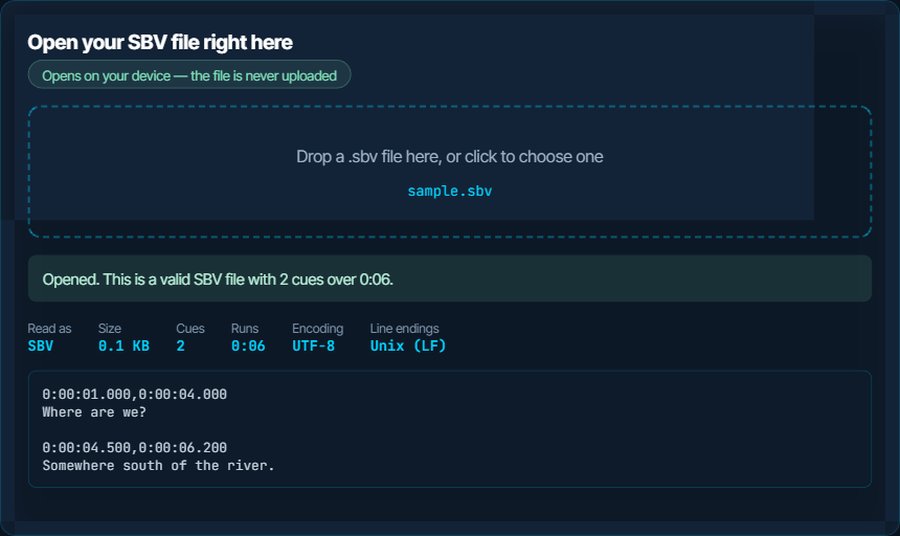
SBV is YouTube's caption format, and about as simple as SRT with one line less: no sequence number, and the two timestamps separated by a comma rather than an arrow, 0:00:01.000,0:00:04.000. The hour has no leading zero, which is the detail that trips converters written for SRT.
You are holding one because YouTube Studio gave it to you. Under Subtitles, the download menu offers .sbv alongside .srt and .vtt, and .sbv was the default for years, so it is what most people end up with. It is also the format YouTube's automatic captions come out in, which is why an SBV so often carries [Music] markers and the rolling, overlapping cues that auto-captioning produces.
Outside YouTube, support is thin. Desktop players generally refuse it, other video platforms will not accept it, and subtitle editors vary. Converting to SRT takes one click below and loses nothing, because SBV has no styling or positioning to lose.
0:00:01.000,0:00:04.000
Where are we?

0:00:04.500,0:00:06.200
Somewhere south of the river.
How to open a SBV file on each device
Windows
Notepad opens it as text, and that is enough to read a transcript. VLC does not reliably load .sbv next to a video; convert to SRT and it does. Subtitle Edit, the free Windows editor, opens SBV directly if you want to edit before converting.
macOS
TextEdit opens it. QuickTime loads no subtitle file at all, and VLC and IINA want SRT or VTT; convert first.
iPhone, iPad and Android
The Files app and Files by Google both show the text. No mobile player takes SBV as a sidecar file; convert to SRT and VLC on either platform loads it.
Back into YouTube
YouTube Studio accepts an .sbv upload directly, which is the one place the format is at home. If you edited the file, upload it to the video under Subtitles → Add → Upload file.
Other platforms
Vimeo, Facebook, LinkedIn, Kaltura, Panopto and course platforms want SRT or VTT. Convert before uploading; the SBV to SRT page below does it in the browser.
In a subtitle editor
Subtitle Edit and Aegisub both import SBV. To edit online, convert to SRT and open it in the subtitle sync tool for timing, or the SRT translator for language.
When it will not open, or opens wrong
VLC or another player ignores the file
Most players do not implement SBV. The file is fine; the player does not know what it is.
The fix: Convert to SRT with the SBV to SRT page. Text and timing are carried over exactly.
Another site rejects the upload
Only YouTube accepts SBV. Every other platform asks for SRT or VTT.
The fix: Convert to whichever the platform names. SBV to VTT is the right one for web players; SBV to SRT for everything else.
A converter mangles the timestamps
SBV writes the hour with one digit, 0:00:01.000, and some tools written for SRT expect two. The result is cues at the wrong times or none at all.
The fix: The converter on this site reads the single-digit hour. The inspector above shows the cue count and total duration, so you can see the file was read correctly before converting.
Cues overlap or repeat the same words
Automatic captions from YouTube roll: each cue repeats the tail of the previous one so the text scrolls. That is by design for YouTube's player and looks wrong everywhere else.
The fix: The inspector counts overlapping cues. Download the captions as SRT from YouTube instead, or clean the overlaps in an editor after converting; there is no automatic fix that keeps the reading rhythm right.
[Music] and [Applause] appear in the subtitles
Auto-captions label non-speech sound. Useful for accessibility, unwanted in a transcript.
The fix: Convert to TXT if you only want the words, or remove the lines in an editor after converting to SRT.
Accents come out wrong
Rare with SBV, because YouTube writes UTF-8, but a file re-saved by an old editor can lose that.
The fix: The inspector reports the encoding and the Download as UTF-8 button restores it.
What to do with it next
Questions people ask
What is an SBV file?
YouTube's caption format: a plain text file with a start and end time on one line and the caption text on the next. YouTube Studio exports it, and it is what automatic captions download as.
How do I open an SBV file?
Any text editor opens it for reading. To use it as subtitles in a player or on another site, convert it to SRT first; almost nothing outside YouTube reads SBV directly.
Can I convert SBV to SRT without losing anything?
Yes. SBV holds only text and timing, and SRT holds both. The conversion is exact.
Why does the SBV from YouTube have repeated lines?
Automatic captions roll, so each cue repeats part of the previous one. Downloading the captions as SRT from YouTube gives the same rolling cues; cleaning them is a manual edit.
Can I upload an SBV file to Vimeo or Facebook?
No. They accept SRT or VTT. Convert first, on this site, and upload the result.
Does VLC play SBV files?
Not reliably. Convert to SRT and VLC loads it next to the video like any other subtitle.