What a SUB file actually is
Open the file in Notepad and look. If every line starts with two numbers in braces, {24}{96}Text, it is MicroDVD: the format counts video frames, not seconds, which is why it is the one that drifts. If it starts with [INFORMATION] and the cues look like 00:00:01.00,00:00:04.00, it is SubViewer, an ordinary timed text format. If Notepad shows binary garbage, it is VobSub: subtitle pictures ripped from a DVD, which come as a pair, the .sub holding the images and a small .idx holding the timing.
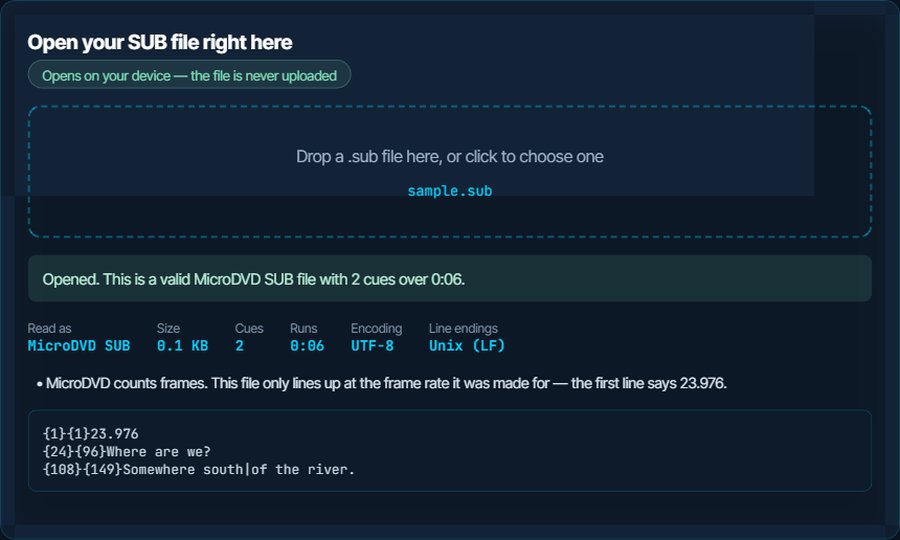
MicroDVD is by far the most common of the three in the wild. It dates from the DivX era, when AVI files and hardware players ruled, and its one design decision, frame numbers instead of timestamps, means a file is only correct at the frame rate it was made for. Some files record that rate on a first line that reads {1}{1}25; most do not.
The inspector above reads MicroDVD and reports the frame rate if the file declares one. For the two text formats, converting to SRT is the fastest way to a file every player accepts. For VobSub there is nothing to convert on this site: it is images, and the only route to text is OCR.
{1}{1}23.976
{24}{96}Where are we?
{108}{149}Somewhere south|of the river.
How to open a SUB file on each device
Windows
VLC, MPC-HC and mpv all play MicroDVD and SubViewer next to a video with the same name. VLC also loads a VobSub pair if the .idx and .sub share the video's name. In VLC, Preferences → Subtitles has a frame-rate setting for MicroDVD files that drift. Notepad opens the two text formats for reading.
macOS
QuickTime loads none of the three. VLC and IINA handle MicroDVD, SubViewer and VobSub pairs. TextEdit reads the text formats.
iPhone and iPad
VLC for iOS plays MicroDVD and SubViewer alongside a video copied into the app, and reads a VobSub pair. The Files app previews the text formats and refuses the binary one.
Android
VLC for Android and MX Player load MicroDVD and SubViewer automatically when the names match, and both read VobSub .idx/.sub pairs. Most other players do not, so convert to SRT for anything else.
In a browser or on YouTube
No browser or upload form accepts any .sub format. Convert to SRT for YouTube, Vimeo and course platforms, or to VTT for a web player. The SUB to SRT page asks for the frame rate, because without it a MicroDVD file cannot be timed.
On a TV or media box
Older Samsung and LG TVs read MicroDVD from a USB stick because the format predates them, and Plex and Kodi read all three. Newer TVs increasingly expect SRT; converting is the safe choice.
When it will not open, or opens wrong
Fine at the start, then steadily earlier or later
A MicroDVD file being played at the wrong frame rate. Made for 23.976 fps and played against a 25 fps video, or the reverse, it drifts 4.1 percent, roughly three minutes over a feature film.
The fix: Convert to SRT with the SUB to SRT page and set the frame rate the file was made for, not the video's. If you do not know it, try 23.976 and 25; one of them lines up. The inspector reports the rate when the file declares one.
The player shows nothing
Either the names do not match, or the file is VobSub without its .idx partner, or it is one of the two text formats and the player only knows the other.
The fix: Match the names first. For VobSub, find the .idx that came with it; without it the timing is gone. For the text formats, convert to SRT and the question disappears.
A vertical bar appears in the middle of lines
MicroDVD uses | to mark a line break. Players that do not know the format print it literally.
The fix: Convert to SRT; the converter turns each bar into a real line break.
Everything is on one long line in Notepad
Unix line endings, which Notepad only learned to read in 2018. The file is fine.
The fix: Open it in another editor, or use the Download as UTF-8 button above, which writes Windows line endings.
Accents are broken
Files from the DivX era are almost always in a Windows code page rather than UTF-8, and players today assume UTF-8.
The fix: The inspector reports the encoding; the Download as UTF-8 button rewrites the file with the accents intact.
Notepad shows binary garbage
It is VobSub: pictures, not text. There is nothing to read.
The fix: Play it with VLC alongside its .idx. To get editable text out, run it through OCR software such as Subtitle Edit; no converter can do it by parsing.
What to do with it next
Questions people ask
Is a SUB file the same as an SRT file?
No. SRT stores timestamps; MicroDVD SUB stores frame numbers, SubViewer SUB stores its own timestamp layout, and VobSub SUB stores pictures. All three are called .sub. The two text ones convert to SRT on this site.
How do I know which kind of SUB file I have?
Open it in a text editor. Braces with numbers mean MicroDVD, an [INFORMATION] header means SubViewer, and unreadable binary means VobSub. The inspector on this page tells you for the text formats.
What frame rate should I use to convert a MicroDVD file?
The one the subtitles were made for, which is usually the frame rate of the video they were ripped with: 23.976 for film sources, 25 for PAL television and DVDs, 29.97 for NTSC. If the file starts with {1}{1} followed by a number, that number is the rate.
Can I open a VobSub file without the .idx?
You can play it in VLC, but without the .idx the timing and language information is missing and the player has to guess. Keep the pair together.
Why do my SUB subtitles drift out of sync?
Because MicroDVD counts frames, and the video is running at a different frame rate from the one the file was made for. Converting to SRT at the correct rate fixes it permanently.
Can I open a SUB file on my phone?
VLC on iPhone and Android plays MicroDVD and SubViewer next to a video and reads VobSub pairs. Nothing built into the phone does, so convert to SRT for any other app.