What a TIFF file actually is
The Tagged Image File Format dates from 1986 and was designed for scanners and desktop publishing. It stores an image with no compression or with lossless compression, at any bit depth, in any colour space including CMYK, with layers, and with several images in one file. That is why it is the format of scans, faxes, archives, print workflows and anything where the pixels must survive untouched. It is also why the files are large: a 300 dpi scan of one page is 25 MB uncompressed.
The multi-page feature is the thing that surprises people. A scanner set to “one file” or a fax machine writes every page into a single TIFF, and most image viewers, Windows Photos and macOS Preview included, only show the first page unless you know where the page controls are. A TIFF that seems to be missing pages usually has them; the viewer is hiding them.
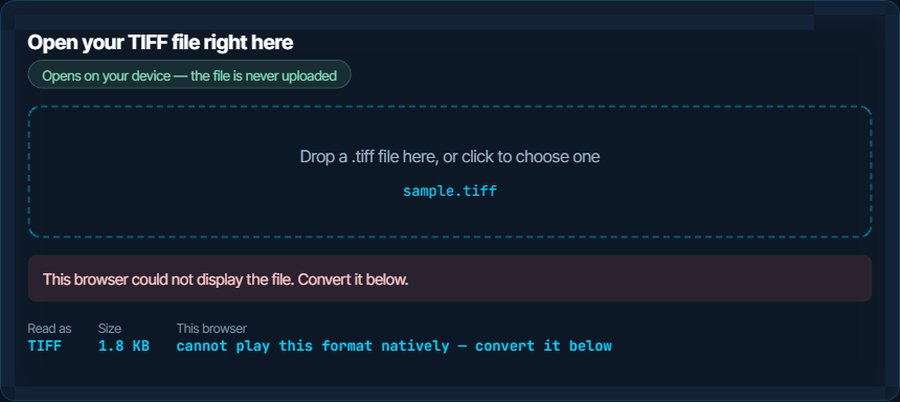
Support is wide on the desktop and thin on the web. No major browser other than Safari displays TIFF, so a file emailed as a link or dropped into a web app shows as a broken image. The inspector above is an honest test of that: in Chrome, Firefox or Edge it will report that the file cannot be displayed, and the fix is the conversion below.
How to open a TIFF file on each device
Windows
Photos, Paint and the legacy Windows Photo Viewer open TIFF. For a multi-page TIFF, Photo Viewer and the Windows Fax and Scan app show the page controls; Photos may show only the first page. IrfanView and XnView handle any TIFF, including 16-bit and CMYK, and are free.
macOS
Preview opens TIFF and shows multiple pages in its sidebar; Quick Look shows the first page. Photos imports it. Preview also exports any page to PDF, JPG or PNG.
iPhone and iPad
Files and Photos open a TIFF and show the first page. Mail displays an attached TIFF inline. For a multi-page fax, open it in Files and swipe, or convert to PDF for a proper page view.
Android
Gallery apps are inconsistent with TIFF; Google Photos and Files by Google open most single-page files and some refuse 16-bit or CMYK ones. XnView or a PDF conversion is the reliable route.
In a browser
Safari displays TIFF. Chrome, Firefox and Edge do not, on any platform, which is why a TIFF on a web page or in a web app is a broken icon. Convert to JPG or PNG before uploading anywhere.
In Photoshop, GIMP, Office and other editors
Every image editor opens TIFF, layers and 16-bit included; it is a native format for Photoshop. Word and PowerPoint insert it, though the file stays large inside the document. Convert to JPG for a document that has to be emailed.
When it will not open, or opens wrong
A browser or web app shows a broken image
Chrome, Firefox and Edge have no TIFF decoder.
The fix: Convert to JPG for a photo or scan, PNG for line art or anything with transparency. The image converter does it in the browser and nothing is uploaded.
Only the first page shows
It is a multi-page TIFF, from a scanner or a fax, and the viewer shows one page at a time without saying so.
The fix: Open it in macOS Preview, Windows Photo Viewer or IrfanView, which have page controls. The image converter here converts the first page; for all pages, export to PDF from Preview or Fax and Scan.
The file is enormous
Uncompressed pixels at scanner resolution. A colour A4 page at 600 dpi is 100 MB.
The fix: Convert to JPG for sharing; a scan of a document loses nothing legible at high quality. Keep the TIFF as the archive copy if it is a photo or a legal record.
The colours look wrong after conversion
The TIFF is CMYK, from a print workflow, and the converter mapped it to RGB without a profile.
The fix: Convert from the application that made it, with its colour profile, or ask for an RGB version. A CMYK TIFF is a print file, not a screen file.
An app says the file is compressed or unsupported
TIFF allows several compression schemes, and some viewers implement only the common ones. Faxes use one, CCITT Group 4, that few photo apps read.
The fix: Open it in IrfanView, XnView or Preview, all of which read every scheme, and convert from there.
You need the text, not the picture
A scanned contract or a fax is an image of words.
The fix: Run it through the OCR tool on kliptools.io, which extracts the text from an image or a scan in over a hundred languages.
What to do with it next
Questions people ask
What is a TIFF file?
A high-quality image format from 1986, used by scanners, fax machines, print shops and archives. It stores pixels without loss, can hold several pages in one file, and is large as a result.
How do I open a TIFF file?
Double-click it on Windows or a Mac: Photos, Paint and Preview all open it. On a phone, Files or Photos. In a browser other than Safari it will not display; convert to JPG or PNG first.
Why does my TIFF only show one page?
It is a multi-page TIFF and the viewer is showing the first page. macOS Preview, Windows Photo Viewer and IrfanView have page controls; converting to PDF shows all pages everywhere.
How do I convert a TIFF to JPG?
Use the image converter on this site: drop the file, choose JPG, download. It runs in the browser and nothing is uploaded. Choose PNG if the image is line art or has transparency.
Does converting TIFF to JPG lose quality?
Yes, a little: JPG is lossy. For a scanned document or a photo shared on screen it is not visible at high quality. Keep the TIFF as the archive copy if the pixels matter.
Is TIFF better than PNG?
Both are lossless. TIFF supports CMYK, 16-bit depth, layers and multiple pages, which print and archive workflows need. PNG is smaller and displays everywhere, including browsers. For anything on screen, PNG wins.